
The Bursar’s View
The Fees Office, without the Paperwork.
A bursar’s term is spent on invoices, receipts, bank alerts and balances that never quite add up. ELBRIVA keeps one ledger for every payment, online and cash, so the numbers are right the first time, and the proprietor sees the same figures you do.
Invoicing
A Term’s Invoices, Ready on Day One
Set the fees once and let ELBRIVA do the arithmetic.
- Fee components, set once. Tuition, books, feeding, uniform and levies, per class and per term. Next term starts from this term’s fees, so you only change what’s new.
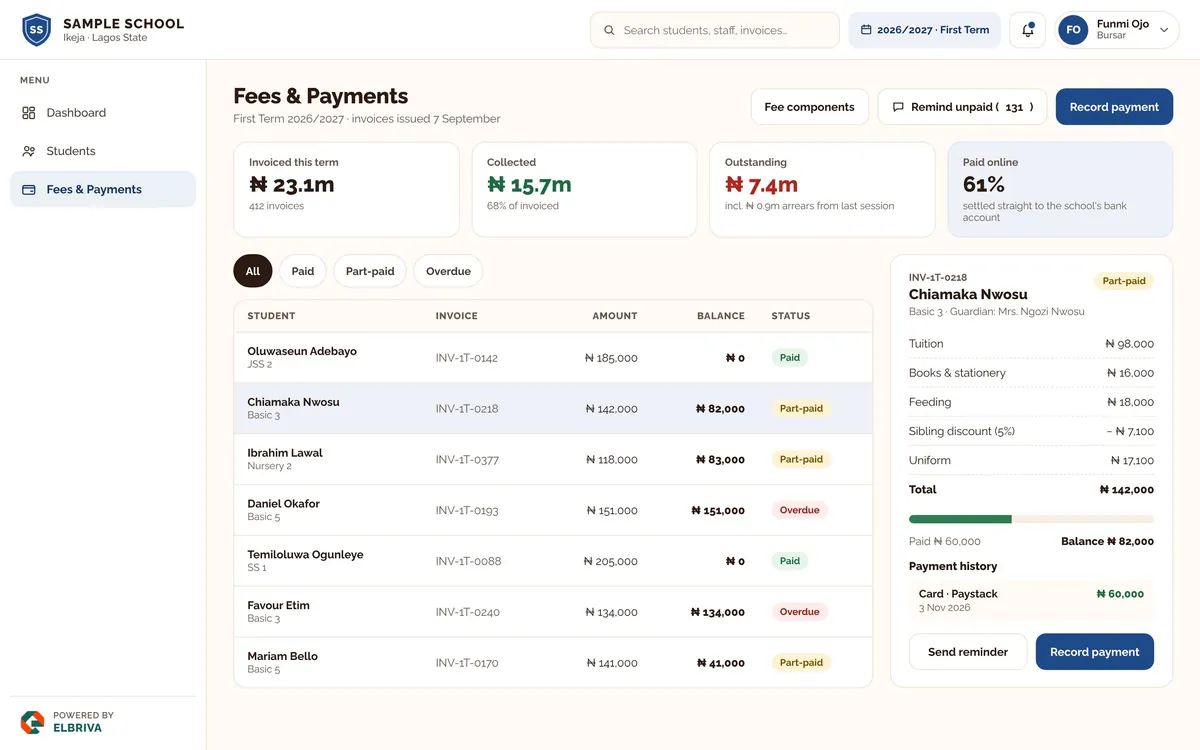
- Discounts worked out for you. Sibling and scholarship discounts are applied on each invoice, with the line shown so parents can see it.
- Check before anything goes out. Preview the whole term’s invoices before you issue them. Parents see theirs the moment you do.
- Instalments and arrears, handled. Put an invoice on an instalment plan. Anything left unpaid carries into next term as its own line, never lost in a notebook.
Payments
Every Payment, One Ledger
Online or at the bursary, every naira lands in the same place.
- Online payments post themselves. Card, bank transfer and USSD payments through Paystack update the invoice and the balance as soon as they’re confirmed, and settle straight into the school’s bank account.
- Cash and transfers in seconds. Record cash, POS, bank deposits and direct transfers against the invoice, tagged by how they were paid, in the same ledger as online payments.
- Money applied in the right order. Arrears are cleared first, then compulsory items, then optional items and levies. Anything paid over is held as credit for the family.
- Receipts, sent and printed. Every payment gets a numbered receipt, sent to the parent in the app, or printed for the parent standing at your desk.
Collections
Know Who Owes What
The balances you used to rebuild from notebooks, kept current for you.
- Where the term stands. What’s been invoiced, what’s been collected, what’s outstanding, arrears included, and how much came in online.
- Who owes what. Filter by paid, part-paid and overdue, and open any family’s invoice to see every item and every payment against it.
- Reminders in one step. Remind every unpaid family at once, by app notification, with WhatsApp or SMS for parents without the app. Families who have paid in full never get one.
Controls
Books That Stand up to Scrutiny
Clear records protect the school, and the bursar who keeps them.
- Nothing quietly deleted. Payments can’t be deleted. A mistake is put right with a reversal, and the reversal needs the proprietor’s approval.
- Every entry has a name on it. Each payment shows how it was paid, who recorded it and when.
- Fees, and only fees. The bursar sees fees and payments, and the student names and classes they need, but not scores or report cards.
Built for the Person Who Keeps the Books
When the fees office runs smoothly, the whole school does. Parents get receipts without queuing, the proprietor gets figures without asking, and the bursar gets the end of term back.

Start This Term. Free on Starter, or Your First Paid Term on Us.
Set up your school in an afternoon, or let us walk you through it.