

Collect school fees, publish report cards and reach every parent, in one place.
Built for Nigerian nursery, primary and secondary schools. Parents pay online and the money settles straight into your school's bank account. Report cards come from scores, not spreadsheets. Notices reach parents as phone notifications, with WhatsApp and SMS as backup.
- Card, bank transfer and USSD
- No extra charge to parents
- Nursery to SS3, three terms
One System for the Office,
the Classroom and the Home.
The Proprietor’s View
Your Whole School, on One Screen.
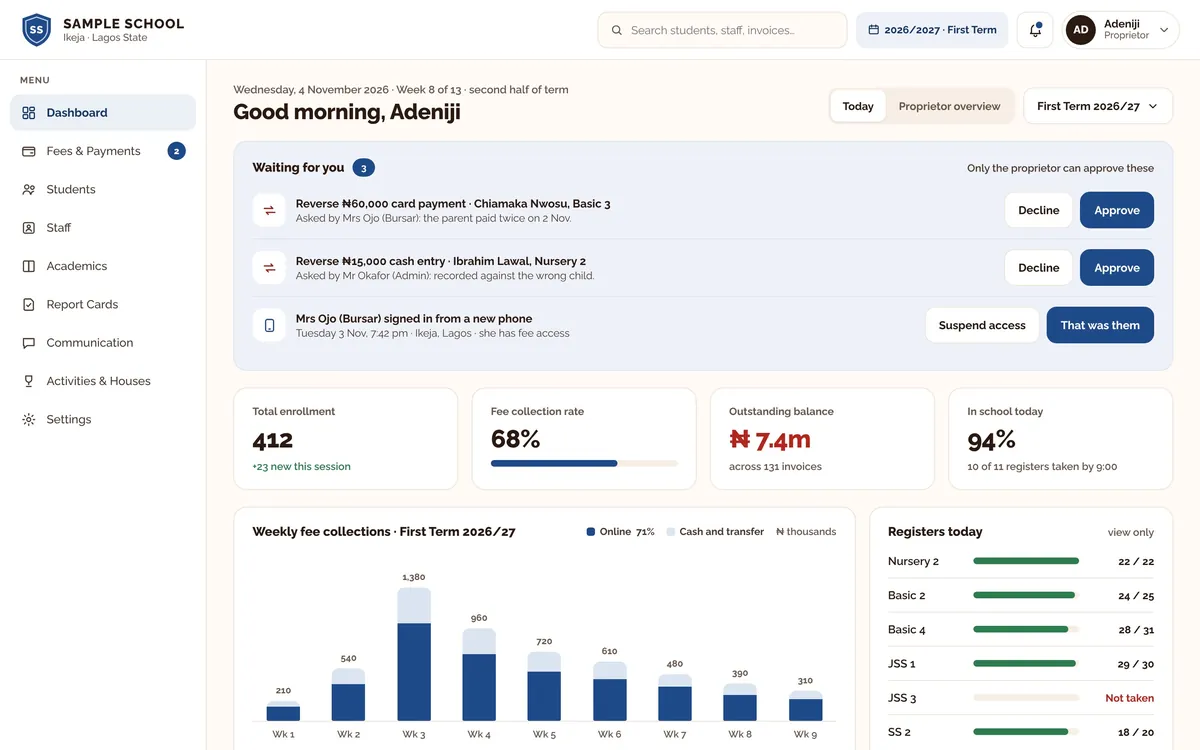
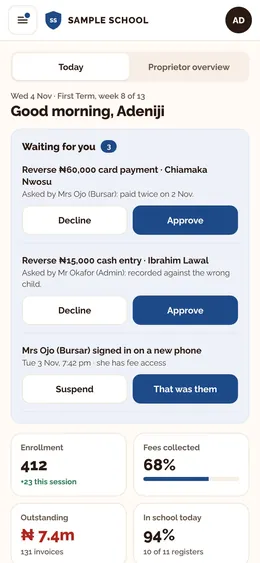
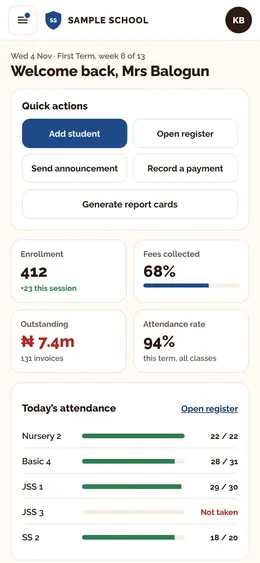
You shouldn’t have to wait for the end of term, or a phone call, to know how your school is doing. ELBRIVA gives proprietors their own view of the school, on laptop or phone.
Online payments appear as Paystack confirms them, cash recorded by your bursar is flagged until it’s seen in the bank, and payment reversals wait for your approval.
See which classes have taken their register by 9 o’clock, who’s in today, and where a class is missing its form teacher.
Your active roll and how it compares with last term, with every student’s class, guardian and fee status in one place.
The Bursar’s View
The Fees Office, without the Paperwork.
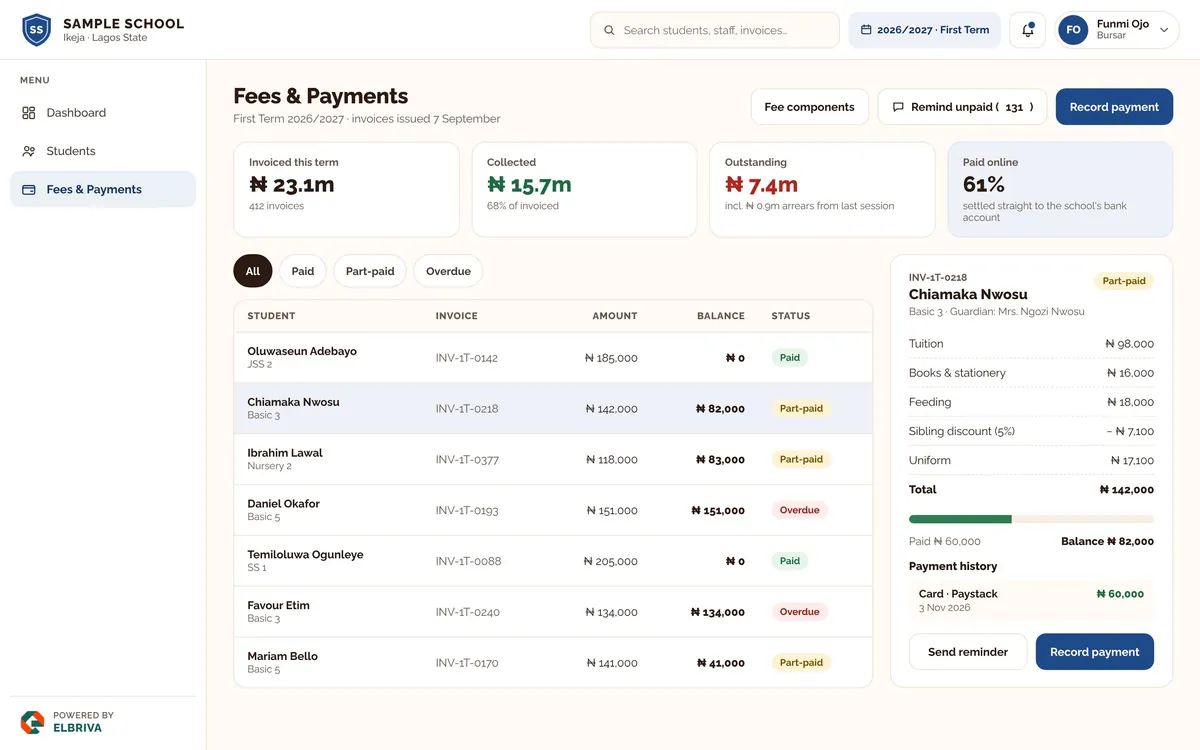
A bursar’s term goes on invoices, receipts and balances that never quite add up. ELBRIVA keeps every payment, online and cash, in one ledger, so the books are right the first time.
When a parent pays by card, bank transfer or USSD through Paystack, the invoice, the balance and the receipt update on their own. No more matching bank alerts to names.
Record cash, POS, bank deposits and direct transfers against the invoice. ELBRIVA applies the money in the right order and sends the parent a numbered receipt.
See at a glance who has paid, part-paid or is overdue, and remind every unpaid family in one step. Families who have paid in full are never reminded.
Term-End Shouldn't Mean Phone Calls, Paper Registers and Late Nights Typing Results.

Chasing Fees
Bursars call parents term after term, with no reliable record of who has paid what.
Hand-Built Report Cards
Fragile spreadsheet templates, every class at once, and errors that reach parents.
Parents out of the Loop
Few parents read email, and SMS is too costly for every update.
The School Admin’s View
The School Office, Organized.
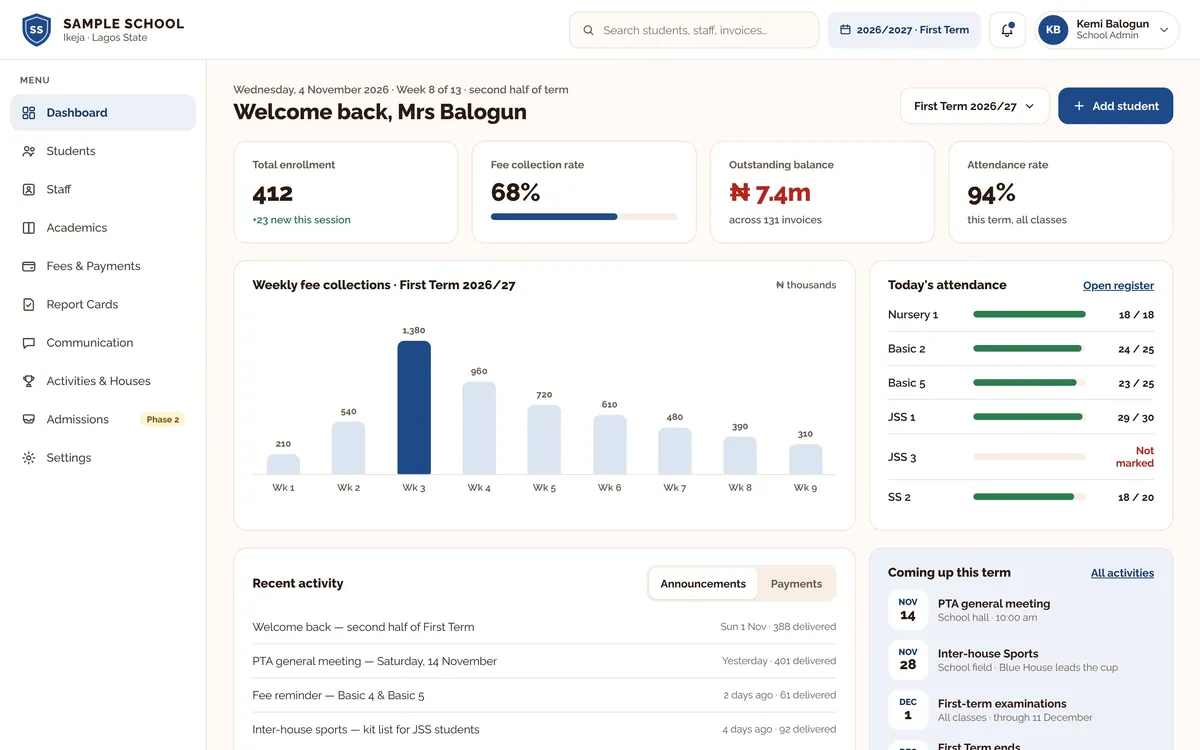
School admins keep everything moving: enrolment, classes, staff, report cards and notices to parents. ELBRIVA gives them one place to set the school up and keep it running, term after term.
Your state’s school calendar, your classes, subjects and grading scheme, set up once and carried into each new term. Promotion at the end of the session is one guided step.
Enrol a student in three steps, with their class, house, guardian and first invoice. Their attendance, fees and results all build on that one record.
Generate a class’s or the whole school’s report cards from the teachers’ accepted scores, check them, and publish to parents when you’re ready.
The Teacher’s View
From Register to Report Card, in One Place.
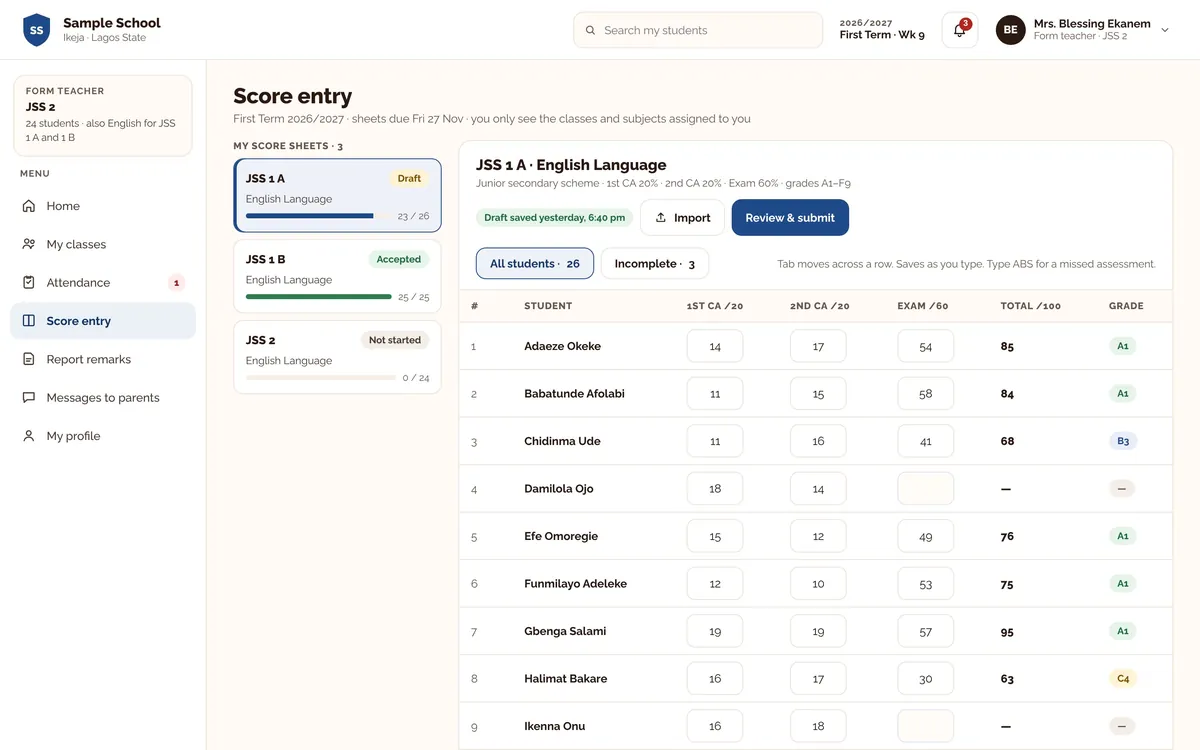
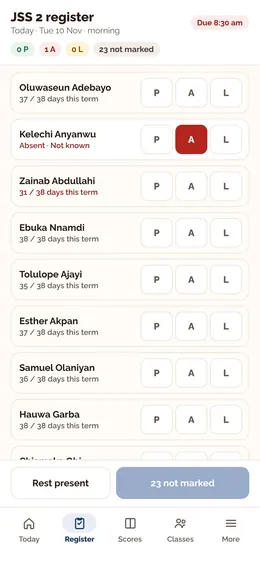
Teachers lose evenings copying scores into spreadsheets and remarks into templates. ELBRIVA keeps the register, the score sheet and the report remarks together, on a laptop or a phone, so the work is done once.
Tap present, absent or late for each child on your phone, or mark everyone else present in one go. Where the school has absence alerts on, guardians hear the same morning.
Enter CA and exam scores for your own classes and subjects. Totals and grades follow the school’s grading scheme, and your sheet saves as you type.
Ratings and a comment for each child, with attendance and averages already filled in. When the class is ready, send it on in one step.
ELBRIVA Features
- Online Fee PaymentsCard, transfer and USSD
- Direct SettlementStraight to the school’s account
- Cash & Manual PaymentsRecorded in the same ledger
- Fee RemindersOnly to families who owe
- Report Card GenerationFrom teachers’ accepted scores
- Configurable GradingYour CA, exam and grade rules
- Score EntryCA and exams, saved as you type
- Daily RegistersTaken in a minute
- Absence AlertsGuardians told the same day
- Parent NotificationsApp first, WhatsApp and SMS backup
- In-app Guide & Tours Coming SoonHelp articles and screen tours
- Proprietor DashboardThe whole school at a glance
- Remark DraftingDrafts for teachers to edit
- Bank Transfer MatchingTransfers matched to families
- Instalment Risk AlertsBefore families fall behind
- Local-language NoticesYoruba, Igbo, Hausa and Pidgin
- WhatsApp Parent AssistantAnswers parents any time
- Mark Sheet ReadingFrom a photo of the sheet
The Details Other School Software Skips.
Built with a design-partner school, around real fee schedules, real report cards and real parents.
- Instalment plans with due dates. A family is only overdue when they fall behind their plan.
- Fee clearance on your terms. You choose what, if anything, waits until fees are cleared, on every plan, including free.
- One login for every child. Parents see all their children, even at different schools. Staff who teach at two schools use one account.
- Your state's school calendar. Term dates and public holidays for your state, ready to adjust.
- House cup built in. Inter-house results update the standings as you enter them.
For Parents
No Queue at the Bursar's Office.

Parents open a link, sign in with their phone number and a one-time code, and add the app to their home screen. No app store, and light enough for a slow connection.
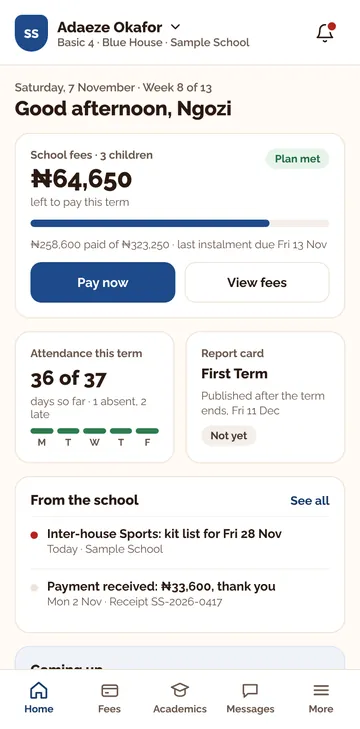
- See fees, balances and receipts for every child
- Pay in full or in part, with no extra charge for paying online
- View attendance and report cards when the school publishes them
- Get notices as phone notifications, with WhatsApp or SMS if one is missed
Getting Started
Running Before Resumption Day.

- 1Sign up your school
Your school's name, logo and colours, and a web address of its own.
- 2Set up classes and fees
Classes and arms, subjects, your grading scheme and this term's fee items.
- 3Connect your bank account
Payments settle to your school's own account through Paystack.
- 4Invite parents
Parents get a link by WhatsApp or SMS, add the app to their phone and turn on notifications.
Plans & Pricing
Free for Small Schools.
Per Student, Per Term for Everyone Else.
Up to 75 students. Fees, payments, results and messaging.
per student per term. Attendance reports, absence alerts, reminders.
per student per term. Houses and activities, your brand colours.
per student per term. CBT, admissions, timetables and more.
Questions
What Schools Ask Us First.
Does the money come to our account or yours?
Your school's. Each school has its own Paystack subaccount linked to the school's bank account, and payments settle there directly.
Do parents pay extra to pay online?
No. The school pays Paystack's processing fee and our commission of 1% per online payment, capped at ₦1,000.
Some parents still pay cash. Is that a problem?
No. The bursar records cash and direct transfers against the invoice, and they appear in the same ledger, tagged by source.
Do parents need to download an app?
No app store. The parent app opens from a link and is added to the home screen, then guides parents to turn on notifications. On iPhone this needs iOS 16.4 or later.
What if a parent doesn't turn on notifications?
They still get every notice, on WhatsApp or by SMS. Notifications are simply the first try: the more parents who allow them, the less of your plan's WhatsApp and SMS allowance you use.
Can we use our own grading and report card format?
Yes. Set your assessment components and weights, grade bands, and whether affective and psychomotor ratings apply.
Does the AI decide grades or act on its own?
No. AI drafts and suggests: remarks, payment matches and notices. Grades, totals and positions come from your grading rules, and a member of staff approves anything before it reaches a parent or the ledger.
What happens when a Starter school grows past 75 students?
We warn you as you approach the limit, and you move to a paid plan from the start of the next term, never mid-term.

Start This Term. Free on Starter, or Your First Paid Term on Us.
Set up your school in an afternoon, or let us walk you through it.