
Pay Fees from Your Phone
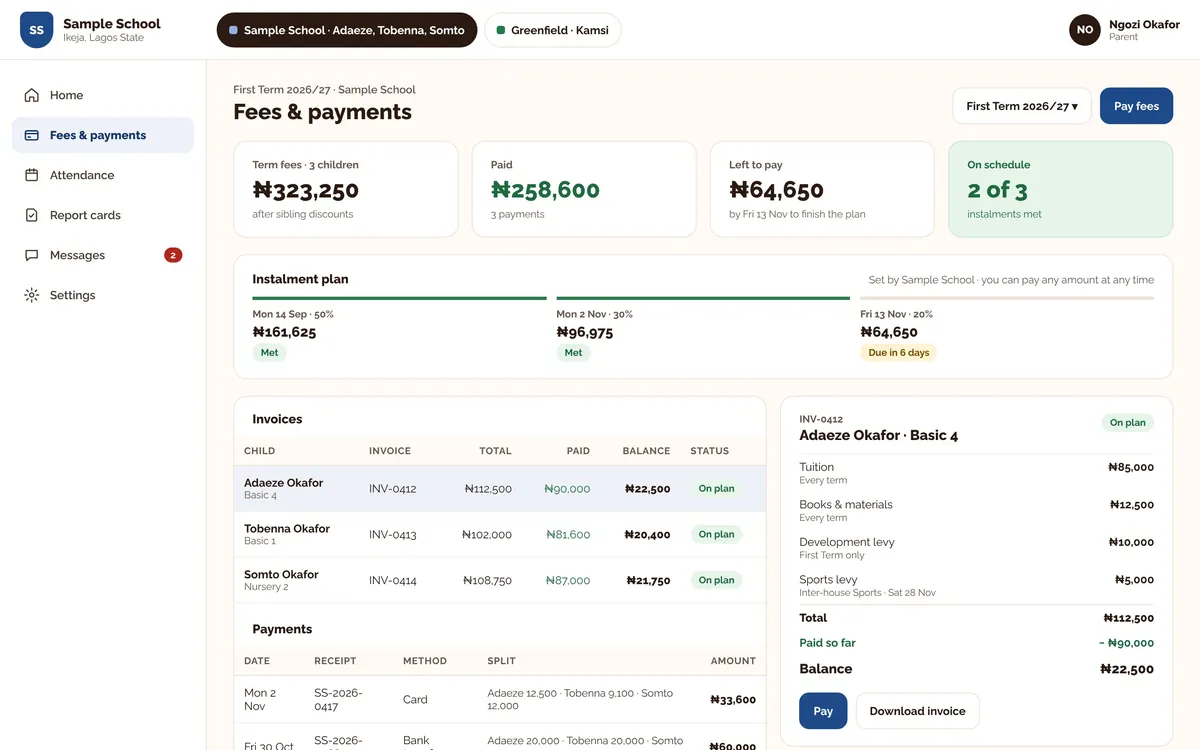
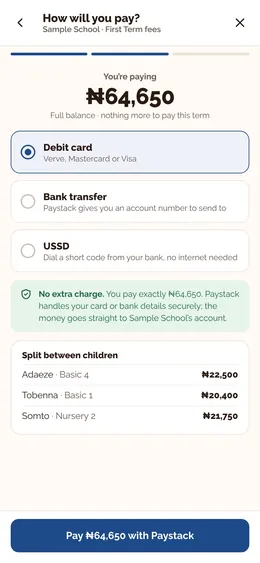
By card, bank transfer or USSD through Paystack, in full or in part. There’s no extra charge for paying online.
Pay school fees, see report cards and attendance, and get the school’s notices, for every child, with one login. No queue at the bursar’s office.
What You Can Do
What you see depends on the features your child’s school has switched on.

By card, bank transfer or USSD through Paystack, in full or in part. There’s no extra charge for paying online.
See each instalment and its due date, what you’ve paid and what’s left. Your receipt is in the app the moment you pay.
View and download your child’s report card as soon as the school publishes it.
See how many days your child has attended this term, and get a same-day alert if they’re marked absent, where your school has switched alerts on.
Announcements, resumption dates, events and inter-house sports, in one place instead of scattered across group chats.
See every child in one place, even when they’re at different schools that use ELBRIVA.
Notifications
The school’s notices arrive as notifications on your phone. If you miss an important one, it follows on WhatsApp, then by SMS, so it still reaches you.
Urgent alerts don't wait. Same-day absence and safety alerts go out as a notification, on WhatsApp and by SMS at once.
iPhone needs iOS 16.4 or later, with the app added to the home screen. Notifications need mobile data or Wi-Fi.
Privacy
Questions
Through your child’s school. The school sends you an invite link by WhatsApp or SMS, and you sign in with your phone number and a one-time code.
No app store. The parent app opens from the link and you add it to your home screen; it then guides you to turn on notifications. On iPhone this needs iOS 16.4 or later.
No. There’s no charge to parents for the app or for paying online. The school pays for ELBRIVA and for the payment processing.
You still get every notice, on WhatsApp or by SMS. Notifications are simply faster.
Some schools hold report cards until fees are cleared. If yours does, you’ll see what’s outstanding and can pay from the same screen. Absence and safety alerts, announcements, invoices and receipts are never held back.
Your child’s school. The school manages that information and can answer, correct or update it. Can’t get through? Write to us and we’ll pass your message to the school.
Open the link your school sent you by WhatsApp or SMS. Can’t find it? Ask the school office to send it again.
Share this page with the proprietor or administrator, or ask them to book a demo.
Book a Demo for a School