
The Teacher’s View
From Register to Report Card, in One Place.
Teachers lose evenings to registers, spreadsheets and report card templates. ELBRIVA brings them together: take the register, enter scores and write report remarks in one place, on a laptop or a phone, and every number you enter carries through to the report card.
Attendance
The Register, Taken in a Minute
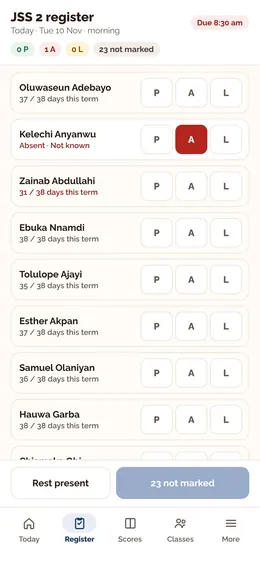
The morning register, without the paper or the end-of-term tally.
- Tap, don’t tick. Present, absent or late for each child, on a laptop or a phone, or mark everyone else present once you’ve marked the absences.
- Absences with a reason. Add a reason when you know it. Late students count as present in the term total, and absences stay on the report card.
- Guardians told the same morning. Where the school has absence alerts switched on, guardians of absent children are messaged when you submit the register.
- Students to watch. See who has fallen below 85% attendance this term, and who has been absent several days in a row.
Score entry
Scores Entered Once, Counted for You
No more totals and grades worked out by hand, or copied between spreadsheets.
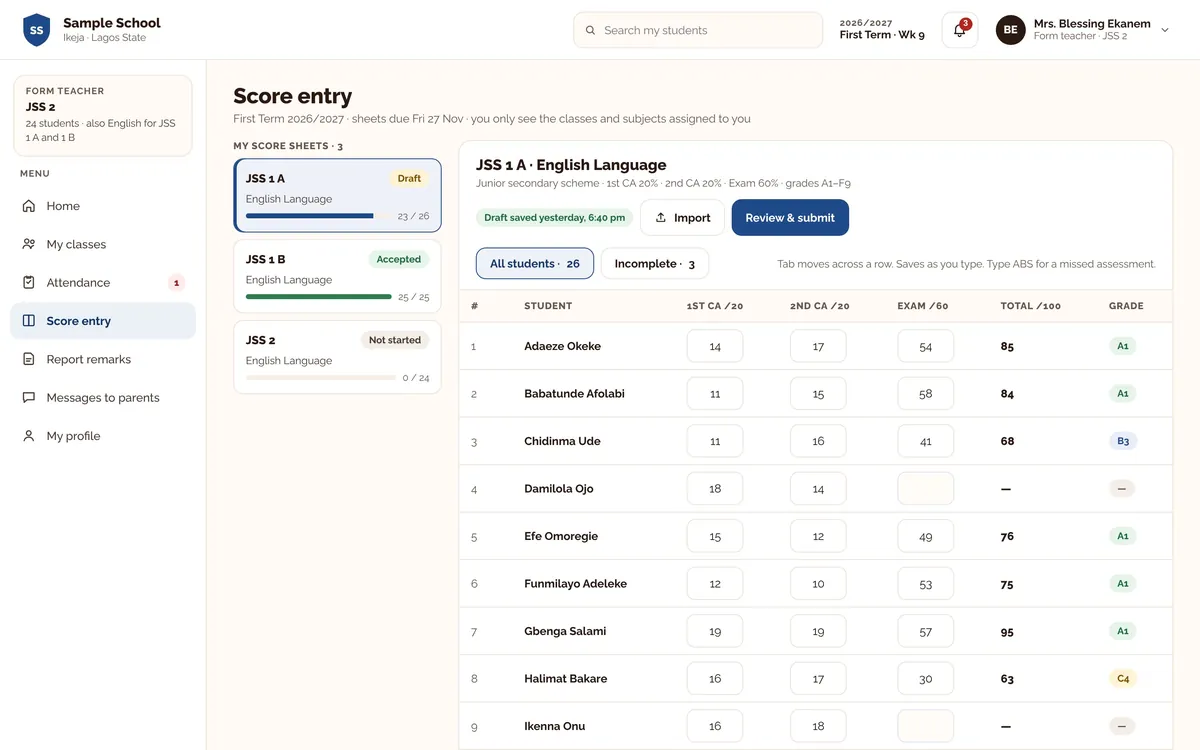
- Only your classes and subjects. Each teacher sees the score sheets assigned to them, and nothing else.
- Built on your school’s grading scheme. CA and exam columns, weights and grades are set once by the school. Totals and grades are worked out as you type.
- Fast on a laptop, easy on a phone. Tab across a row on a laptop, or go one student at a time on a phone. Sheets save as you go, and ABS marks a missed assessment.
- Review, then submit. Check the sheet before it goes in, and see which of your sheets are drafts, submitted or accepted.
Report cards
Report Remarks without the Template
Everything a report card needs from the class teacher, in one screen per child.
- Ratings in a tap. Rate character and skills, such as punctuality, neatness and handwriting, on the school’s scale.
- Comments with a head start. Start from a suggested phrase and make it your own, within the space the report card allows.
- The numbers are already there. Attendance, subjects in and the average so far fill in as score sheets are accepted.
- Start before every score is in. Remarks open while subject sheets are still coming in. When the class is ready, send it to the proprietor; the school publishes report cards when it’s ready.
Your day
Know What Needs Doing Today
Your home screen puts the day’s work in order.
- One list of what needs doing. The register, unfinished score sheets and students to follow up, in the order they matter.
- Deadlines you can see. Score sheet and remarks due dates, and the term calendar, in one place.
- Notices from the office. Messages from the school office sit on your home screen, so nothing is missed.
Help from AI, for the Heavy Weeks
Coming SoonFor the end of term, when every class needs its scores and remarks at once. The teacher always checks and decides.
A first draft of each child’s comment, from their scores and ratings, for you to edit.
Take a picture of a handwritten mark sheet and check the scores before they go in.
Built for the People Who Teach
Teaching is the work that matters most in a school. ELBRIVA takes care of the counting, copying and chasing around it, so teachers get their evenings back and parents get report cards they can trust.

Start This Term. Free on Starter, or Your First Paid Term on Us.
Set up your school in an afternoon, or let us walk you through it.